Showing posts with label General. Show all posts

February 10, 2012

Different ways to run Attribute Change Run(ACR) in SAP BI

Sometimes due to some issue or user requirement we will do master data loading apart from daily loading. After master data loading is done, the first doubt we get is do I need to run ACR or Activating master data is enough.

What is ACR? : We need to run ACR when you have aggregates which are using your characteristics. ACR will update newly added/changed master data to aggregates and activates the master data in characteristic.

What is Activate master data? : Activate master data activates the newly or changed master data(which is in M version), but it will not update the same to aggregates.

So ACR is required if you have aggregates which are suing these characteristics.

Generally in Projects this ACR will be done as part of Process chain after master data loading is done.

How can we run ACR for one characteristic or multiple individually. This can be done in 2 ways.

First:
1) Goto RSA1
2) In menu bar, click on Tools --> Apply Hierarchy/Attribute Change.


3) In the next screen, click on "Info Objects" list. You will get the list of characteristics for which ACR is required. By default all the characteristics will be selected, unselect the characteristics for which you don't want to run ACR.

Note: If you don't get your info object here, then ACR is not required for this characteristic.


4) Now click on execute, you can monitor the job in SM37.

Second:

1) Go to SE38, give the program RSDDS_AGGREGATES_MAINTAIN and click on execute.

2) In the next screen enter the characteristics for which you want to run ACR and execute.This will be done as fore ground.

Note: If you want to run this as back ground job, then in menu bar --> program --> execute in back ground.


Hope it helps...

February 3, 2012

Use of Aggregates,Compression, Roll Up and Partitioning in SAP BI


Aggregates:

Aggregates are used to improve query performance. Say you have cube with 30 characteristics and everytime you run query on this cube, it is hitting 10 characteristics frequenty.

So to improve the query performace create Aggregate on those characteristics. Instead of seraching for data in Cube, query will hit the Aggregate first.

Compression:

As we all know, we have two tables in info cube for transaction data(F-table and E-Table). F-table will store facts data and E-table will store compressed data. COmpression also used to improve the query performance and loading performance.

Query Performance:

Compression is nothing but removing request number an aggregating key figure values based characteristics data. We can get same sales documnet in different request(lets assume we got same sales document 5 times into cube in different request). When we compress it will become one record based on sales document number, so when we execute query system has to pick only one record instead of 5 records. this will improves query performance.

Loading Performance:

It is recommended to delete and re-create the index when we load the data into cube. Deleting index will delete the index for data in Ftable and re-creates. If you have huge uncomressed data in cube(F-table is high), delete and create index steps will take log time to complete.

Roll Up:

This is nothing but updating the lastest transaction data to aggregates which is loaded to Info Cube (if you have any aggregates on cube).

Partitioning:

This is also used to improve the query performance and we can do partitioning in two ways

i) Logical partitioning

ii) Physical partitioning(database level partitioning)

refer below links for clear information about partitioning.


Hope it helps...

February 2, 2012

How to de-schedule or reschedule jobs/process chains in SAP in single shot using programs

When we are working in Support projects we often face upgrades or system outages. When there is an outage/upgrade we need to de-schedule all the loads in BW system and reschedule them once system comes from outage/maintenance.

Then the first thing which comes in our mind is how can i stop all the chains running in my system in one shot. If we have huge number of process chains, it is going to be hassle process to perform.

The below blog will give you how we can do this using programs.

Hope it helps...

January 26, 2012

challenges in implementation project

The below link will gives information about the general challenges we face in implementation project.


challenges in implementation

January 11, 2012

How many users are logged into the system at present

Using the below T-code AL08, we can find how many users are logged in to the system ate present.
 
Same this can be seen in table USR4.

We can try the below transactions as well

SM04, AL08 or RSUSR200.

Error During the retrieval of the logon data stored in secure storage in SAP BI

We get this type of error in different situation.

1) While importing any transports in BW system
2) Activating any Object in BW system
3) Accessing RSA1 --> data sources related to any particular source system.

In this situation, have a look at the below notes
538052 and 644015

January 10, 2012

SD and FI Application Tables


FI/CO :
FI :
Master data:
SKA1 Accounts
BNKA    Bank master record
Accounting documents // indices:
BKPF    Accounting documents
BSEG    item level
BSID    Accounting: Secondary index for customers 
BSIK    Accounting: Secondary index for vendors 
BSIM    Secondary Index, Documents for Material 
BSIP    Index for vendor validation of double documents 
BSIS    Accounting: Secondary index for G/L accounts
BSAD   Accounting: Index for customers (cleared items) 
BSAK   Accounting: Index for vendors (cleared items) 
BSAS   Accounting: Index for G/L accounts (cleared items)
Payment run:
REGUH Settlement data from payment program
REGUP Processed items from payment program
CO :
TKA01    Controlling areas
TKA02    Controlling area assignment
KEKO      Product-costing header
KEPH      Cost components for cost of goods manuf.
KALO      Costing objects
KANZ      Sales order items - costing objects
Cost center master data:
CSKS      Cost Center Master Data
CSKT      Cost center texts
CRCO      Assignment of Work Center to Cost Center
Cost center accounting:
COSP      CO Object: Cost Totals for External Postings
COEP      CO Object: Line Items (by Period)
COBK      CO Object: Document header
COST      CO Object: Price Totals
Sales and Distribution (SD) :
VBFA   Document flow (alg.)
VTFA   Flow shipping documents
Sales order :
VBAK   Header data
VBAP   Item data
VBPA   Partners in sales order
VBKD   Sales district data
VBEP   Data related to line items, delivery lines
Billing document :
VBRK   header data
VBRP   Item data
Shipping :
VTTK   Shipment header
VTTP   Shipment item
VTTS   Stage in transport
VTSP   Stage in transport per shipment item
VTPA   Shipment partners
VEKP   Handling Unit - Header Table
VEPO   Packing: Handling Unit Item (Contents)
Delivery :
LIKP  Delivery header
LIPS  Delivery item
Pricing :
KONH    Conditions header
KONP     Conditions items
KONV     Procedure ( billing doc or sales order)
contracts :
VEDA Contract data

SAP SD Tables

Sales and Distribution:
Customers:
Table  Description
KNA1   General Data
KNB1   Customer Master – Co. Code Data (payment method, reconciliation acct)
KNB4   Customer Payment History
KNB5   Customer Master – Dunning info
KNBK   Customer Master Bank Data
KNKA   Customer Master Credit Mgmt.
KNKK   Customer Master Credit Control Area Data (credit limits)
KNVV   Sales Area Data (terms, order probability)
KNVI   Customer Master Tax Indicator
KNVP   Partner Function key
KNVD   Output type
KNVS   Customer Master Ship Data
KLPA   Customer/Vendor Link
Sales Documents
VBUK   Header Status and Administrative Data
VBAK   Sales Document - Header Data
VBKD   Sales Document - Business Data
VBUP   Item Status
VBAP   Sales Document - Item Data
VBPA   Partners
VBFA   Document Flow
VBEP   Sales Document Schedule Line
VBBE   Sales Requirements: Individual Records
SD Delivery Document
LIPS   Delivery Document item data, includes referencing PO
LIKP   Delivery Document Header data
Billing Document  
VBRK   Billing Document Header
VBRP   Billing Document Item
SD Shipping Unit  
VEKP   Shipping Unit Item (Content)
VEPO   Shipping Unit Header

Table to find Info Package associated to Data Source

Most of the times, we will get requirement to find out Info Package which is loading data to a particular Data Source.

1) Goto SE16
2) Give the table name :RSLDPIO
3) Give your Data Source name in field OLTPSOURCE and execute.

LOGDPID field gives you the Info Package associate to the Data Source.

January 9, 2012

How to fill the InfoCube using ABAP program in SAP BW

This will explain about the step by step procedure to fill the Info Cube with random data using an ABAP program. This is very useful if you don't have data model for your info cube and if you want to show the business model to your customer in short span.

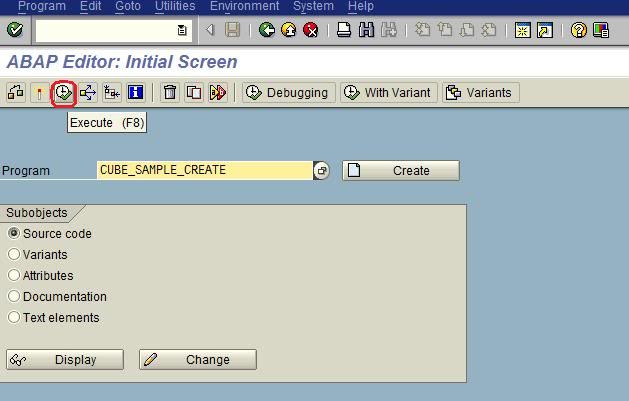
Program to use for this purpose : CUBE_SAMPLE_CREATE.

1) goto SE38, give the program CUBE_SAMPLE_CREATE and execute.


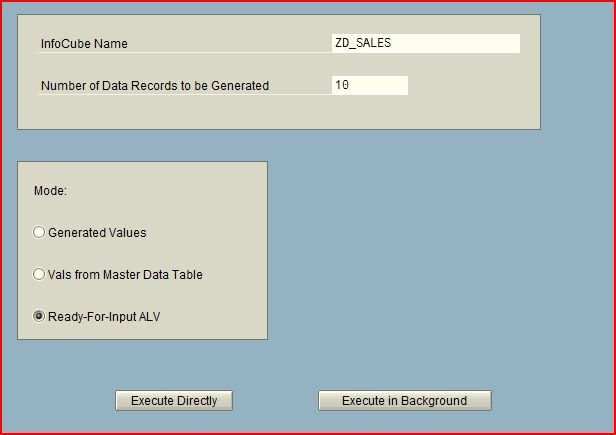
2) Now you will get the below screen.
--> give the info cube name.
--> select how many records has to update to the Info Cube.
You will find 3 options at bottom:

a) generated values : for all the fields(characteristics and key figures) system will generate random values and update to the Info Cube.

b) Vals from master data tables: values for characteristics will be picked from master data tables (If you have data in master data tables of characteristics) and system will generate the default values for key figures. both will be updated to the Info Cube.

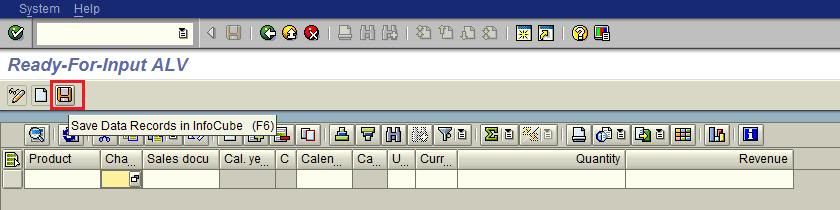
c) Ready for Input ALV: If you want to enter the data into cube manuallt then you have to choose this option. One more advantage of this is, it works like simulation mode, you can see the data before it gets update to the cube.

click on option "excute directly".

In this example I have slected 3 option, and taken 10 records.


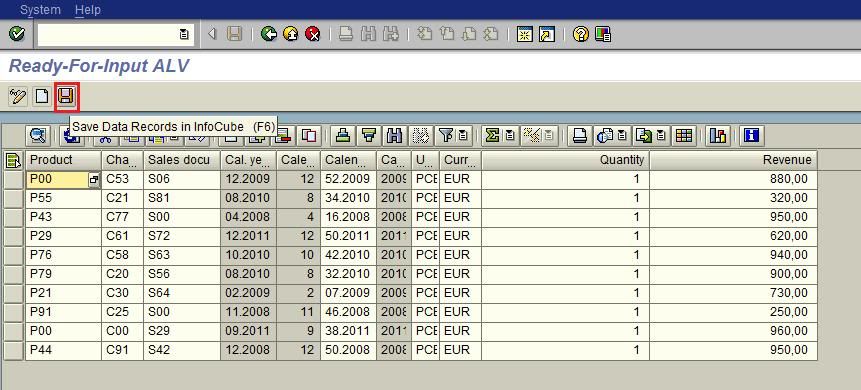
3) Now you will get the below screen.


this is the data generated by the system. If you want to write this data to your cube, just click on save.


Lest take a scenario where you want to enter all the data manually or you have data with you, then to fill that into Info Cube follow the below steps.

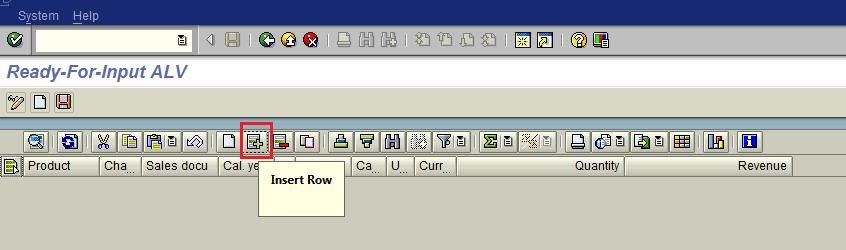
4) In the second step instead of selecting 10 records, select 0(zero) and click on execute. You will get below screen.


To add the new record, click on Insert row and enter values for fields.


follow the same steps untill you are done with all you records. then click on save to update the data to your Info cube.

Hope it helps...!!!!

January 2, 2012

BEST Books for SAP BI

Hi Everyone,

The below 3 books are the best books for SAP BI.

1) A Practical guide to SAP Netweaver Business Warehouse(BW) 7.0 By Bharat Patel, Amol Palekar and Shreekant Shiralkar
This books will give you give complete overview of SAP BI 7.0. It covers complete reporting(Query Designer, Bex Analyzer and WAD). Everything is explained clearly.

2) Data Warehousing With Sap Bw7: Bi In Sap Netweaver 2004s : Architecture, Concepts, And Implementation By Christian Mehrwald and Sabine Morlock
This book doesn't cover reporting part, but very good book for complete modelling and about the issues we get realtime.

3) SAP Business Information Warehouse Reporting By Peter Jones

This covers entire reporting.

This 3 books are enough for SAP BI.

December 19, 2011

Different jobs in SM37 when process chain runs


The below table gives the information about the jobs run in SM37 when we run process chains.

Job Name
Description
Program
Variant ( TYPE)
BI_PROCESS_ABAP
Job for ABAP Program
RSPROCESS
ABAP
BI_PROCESS_ATTRIBCHAN
Attribute Change Run Job
RSPROCESS
ATTRIBCHAN
BI_PROCESS_DROPCUBE
Delete the contents of the cube Job
RSPROCESS
DROPCUBE
BI_PROCESS_DROPINDEX
Delete Database indexes Job
RSPROCESS
DROPINDEX
BI_PROCESS_DTP_LOAD         
Load data using a DTP
RSPROCESS
DTP_LOAD
BI_PROCESS_INDEX
Create Database Indexes
RSPROCESS
INDEX
BI_PROCESS_LOADING
Load data using Info Package
RSPROCESS
LOADING
BI_PROCESS_ODSACTIVAT
ODS Activation
RSPROCESS
ODSACTIVAT
BI_PROCESS_ROLLUP
Rollup to BWA/Aggregates
RSPROCESS
ROLLUP
BI_PROCESS_TRIGGER
Start of Process Chain
RSPROCESS
TRIGGER
BI_PROCESS_PSADELETE
Delete the contents of PSA
RSPROCESS
PSADELETE

December 18, 2011

SD LO Data sources and Source tables

Most of the time we will find difficult to find the source tables for LO data sources.

Here i have given information SD LO Data sources.

VBRK(Billing Doc Header), 
VBRP(Billing Doc Item), 
VBAK(Sale Doc Header), 
VBAP(Sale Doc Item), 
VBUK(Sale Doc Header status) 
VBUP(Sale Doc Item Status), 
LIKS (Delivery header Data) 
LIPS(Delivery item Data) ,

2LIS_11_VAHDR --> VBAK,VBUK
 
2LIS_13_VDITM --> VBRK,VBRP,VBUK,VBUP 

2LIS_13_VDHDR --> VBRK,VBUK 

2LIS_11_VAITM --> VBAK,VBAP,VBUK,VBUP 

2LIS_12_VCHDR --> LIKP,VBUK 

2LIS_12_VCITM --> LIKP,LIPS,VBUK,VBUP

December 14, 2011

Useful functional modules in SAP BI

Below the some of the useful functional modules in SAP BI


RRMX_WORKBOOK_DELETE  Delete BW Workbooks permanently from Roles & Favourites 
RRMX_WORKBOOK_LIST_GET  Get list of all Workbooks 
RRMX_WORKBOOK_QUERIES_GET  Get list of queries in a workbook 
RRMX_QUERY_WHERE_USED_GET  Lists where a query has been used  
RRMX_JUMP_TARGET_GET  Get list of all Jump Targets 
RRMX_JUMP_TARGET_DELETE  Delete Jump Targets 
MONI_TIME_CONVERT  Used for Time Conversions. 
CONVERT_TO_LOCAL_CURRENCY  Convert Foreign Currency to Local Currecny. 
CONVERT_TO_FOREIGN_CURRENCY  Convert Local Currency to Foreign Currency. 
TERM_TRANSLATE_TO_UPPER_CASE  Used to convert all texts to UPPERCASE 
UNIT_CONVERSION_SIMPLE  Used to convert any unit to another unit. (Ref. table : T006) 
TZ_GLOBAL_TO_LOCAL  Used to convert timestamp to local time 
FISCPER_FROM_CALMONTH_CALC  Convert 0CALMONTH or 0CALDAY to Financial Year or Period 
RSAX_BIW_GET_DATA_SIMPLE  Generic Extraction via Function Module 
RSAU_READ_MASTER_DATA  Used in Data Transformations to read master data InfoObjects 
RSDRI_INFOPROV_READ Used to read Infocube or ODS data through RFC 
RSDRI_INFOPROV_READ_DEMO 
RSDRI_INFOPROV_READ_RFC 
DATE_COMPUTE_DAY  Returns a number what day of the week the date falls on. 
DATE_TO_DAY 
DATE_GET_WEEK  Will return a week that the day is in. 
RP_CALC_DATE_IN_INTERVAL  Add/Subtract Years/Months/Days from a Date. 
RP_LAST_DAY_OF_THE_MONTHS  Determine Last Day of the Month. 
SLS_MISC_GET_LAST_DAY_OF_MONTH 
RSARCH_DATE_CONVERT  Used for Date Converstions. We can use in Info Package routines. 
RSPC_PROCESS_FINISH    To trigger an event in process chain 
DATE_CONVERT_TO_FACTORYDATE  Returns factory calendar date for a date 
CONVERSION_EXIT_PDATE_OUTPUT  Conversion Exit for Domain GBDAT: YYYYMMDD  -> DD/MM/YYYY 
CONVERSION_EXIT_ALPHA_INPUT  Conversion exit ALPHA, external->internal 
CONVERSION_EXIT_ALPHA_OUTPUT  Conversion exit ALPHA, internal->external 
RSPC_PROCESS_FINISH  Finish a process (of a process chain) 
RSAOS_METADATA_UPLOAD  Upload of meta data from R/3 
RSDMD_DEL_MASTER_DATA  Deletion of master data 
RSPC_CHAIN_ACTIVATE_REMOTE  To activate a process chain after transport 

Some of the useful ABAP Programs in SAP BI

Below are the some mostly used ABAP program in SAP BI

RSCDS_NULLELIM


Delete fact table rows where all Key Figure values are zero. See Note 619826. 

RSDG_CUBE_ACTIVATE
Activation of InfoCubes 

RSDG_CUBE_COPY
Make InfoCube Copies 

RSDG_CUBE_DELETE
Delete InfoCubes 

RSDG_DODS_REPAIR
Activation of all ODS Objects with Navigation Attributes

RSDG_ODSO_ACTIVATE
Activation of all ODS Object

RSDG_IOBJ_ACTIVATE
Activation of all InfoObjects

RSDG_IOBJ_DELETE
Deletion of InfoObjects

RSDG_IOBJ_REORG
Repair InfoObjects

RSDG_IOBJ_REORG_TEXTS
Reorganization of Texts for InfoObject

RSDG_MPRO_ACTIVATE
Activating Multiproviders 

RSDG_MPRO_COPY
Make Multiprovider Copies 

RSDG_MPRO_DELETE
Deleting Multiproviders 

RS_COMSTRU_ACTIVATE_ALL
Activate all inactive Communication Structures 

RS_TRANSTRU_ACTIVATE_ALL
Activate Transfer Structure 

RSAU_UPDR_REACTIVATE_ALL
Activate Update Rules 

RRHI_HIERARCHY_ACTIVATE
Activate Hierarchies 

SAP_AGGREGATES_ACTIVATE_FILL
Activating and Filling the Aggregates of an InfoCube 

SAP_AGGREGATES_DEACTIVATE
Deactivating the Aggregates of an InfoCube 

RS_PERS_ACTIVATE
Activating Personalization in Bex(Inactive are highlighted) 

RSSM_SET_REPAIR_FULL_FLAG
Convert Full Requests to Repair Full Requests 

SAP_INFOCUBE_DESIGNS
Print a List of Cubes in The System and Their Layouts 

SAP_ANALYZE_ALL_INFOCUBES
Create DB Statstics for all InfoCubes 

SAP_CREATE_E_FACTTABLES
Create Missing E-Fact Tables for InfoCubes and 
Aggregates 

SAP_DROP_EMPTY_FPARTITIONS
Locate/Remove Unused or Empty partitions of F-Fact Table 

SAP_DROP_TMPTABLES
Remove Temperory Database Objects 

SAP_RSADMIN_MAINTAIN
Add, change, delete RSADMIN table entries 

CUBE_SAMPLE_CREATE
A fast way to put some "sample" records in a InfoCube. No need to use Flatfiles, just enter the value in a ALV-Grid or let fill the Cube with random value. 

SAP_CONVERT_NORMAL_TRANS
Convert BasisCube to Transactional Cube and the opposite way around.